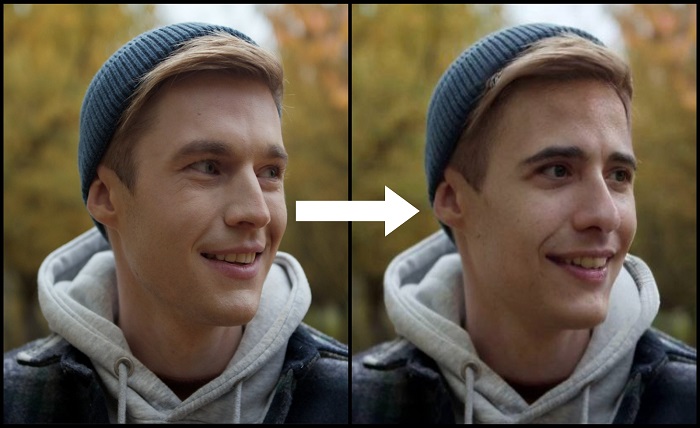
Face swap used to live inside a handful of dedicated apps. In 2026, it has spread everywhere, TikTok’s editor, mainstream video editing software, browser extensions, and standalone AI tools all now offer some version of it. That spread makes video face swap ai harder to shop for than it looks, since a feature bolted onto a video editor rarely performs the same as a tool built specifically around face swapping. I spent two weeks running the same test clip, a 10-second video with head turns and a hand briefly crossing the face, through ten of these tools to see which ones actually hold up. Here is what I found.
Quick Answer: The Best AI Video Face Swap Tools at a Glance
| Tool | Category | Best For | Free Plan | Starting Paid Price |
| Magic Hour | Creative suite | All-around creators, agencies, developers | Yes, 3 daily swaps, no signup | $10/month (annual) |
| CapCut | Video editor | Mobile-first creators already editing in CapCut | Yes, watermark-free basics | ~$5.99/month |
| Wondershare Filmora | Video editor | Timeline editors wanting face swap alongside full editing | Free tier available | Varies by plan |
| VEED.io | Video editor | Social-first captioned and edited content | Yes, watermarked | $18/month |
| HitPaw Online AI Swap | Browser-based swapper | Fast, free casual swaps | Yes, unlimited | Free |
| FaceFusion | Open source | Developers and technical users needing full control | Free, self-hosted | Free (own hardware) |
| FaceMagic | Mobile app | Android users wanting video deepfake-style swaps | Limited free | Varies by plan |
| Vidwud | Browser-based swapper | Free, unlimited photo swaps with credit-based video | Yes, unlimited photo swaps | $12.99/month for video |
| CyberLink PhotoDirector | Photo and video editor | Users wanting face swap inside a broader editing suite | Free tier available | Varies by plan |
How I Chose These Tools
I ran the same three test scenarios across every platform: a clean, well-lit frontal clip, a clip with head turns and a hand crossing the face, and a two-person scene needing separate swaps. I judged each tool on four things: how well the swap held together through motion and partial occlusion, whether results looked consistent frame to frame rather than flickering, how the tool fit into an existing editing workflow versus requiring a separate app, and whether pricing was transparent enough to predict a real cost. Several tools on this list turned out to be features bolted onto a broader editor rather than dedicated face swap products, which shows up clearly in output quality on harder footage.
1. Magic Hour
Magic Hour leads this list because face swap here is a dedicated, purpose-built feature, not an add-on inside a general editor. It connects directly to a broader creative workflow, so a face swap can feed straight into lip sync or talking photo generation without exporting and re-uploading between separate apps.
Pros:
- No signup required to try the tool; 3 free video face swaps per day with no account
- Video face swap ai built as a dedicated tool, not a feature buried inside a general-purpose editor
- Credits never expire once earned, unlike most competitors where unused monthly credits reset to zero
- Handles motion and partial occlusion, like a hand crossing the face, more reliably than editor-bundled competitors
- One-click multi-step workflows (swap, then lip sync, then upscale) without re-exporting between steps
- Parallel generations with no concurrency cap on paid plans
- Weekly feature releases, full API parity, and founder-level support responses for account issues
Cons:
- Free tier clips are capped at 10 seconds and 576p; longer, higher-resolution output requires a paid plan
- Best results depend on a clear, front-facing source photo, a limitation shared with every tool on this list
If you want a dedicated Video face swap ai tool rather than a feature tucked inside a broader video editor, this is difficult to beat, especially once a project needs more than a single swap and moves into lip sync or further editing.
Pricing: Free (3 daily video face swaps, no signup, 576p). Creator: $15/month, or $10/month billed annually ($120/year). Pro: $39/month, with 1472px export. Business: $99/month, built for teams and agencies with 4K export and unlimited concurrent generations.
2. CapCut
CapCut brings face swap into its mobile-first video editor, built around templates rather than open-ended custom swapping.
Pros:
- Fully integrated into an editor most short-form creators already use daily
- Many face swap effects and templates are free, including watermark-free basics
- Fast, template-driven workflow well suited to trending TikTok and Reels formats
- Powered by newer underlying models, giving reasonably natural results on simple, front-facing swaps
Cons:
- No standalone face swap tool; it exists only as one feature inside the broader CapCut editor
- Most swaps rely on available templates, which limits creative control compared with dedicated tools
- Detailed blending, lighting, and realism controls lag behind tools built specifically around face swapping
For creators already living inside CapCut for editing, the built-in face swap saves a step. For anyone who needs precise control over blending and realism, a dedicated tool will outperform it.
Pricing: Free (watermark-free basics included). Premium plans from approximately $5.99/month for additional assets and features.
3. Wondershare Filmora
Filmora’s VideoGen feature brings AI face swap into a full timeline-based video editor aimed at creators who want editing and swapping in the same app.
Pros:
- Full timeline editing sits alongside the face swap feature, useful for projects needing more than a single swapped clip
- 4K upscaling and broader enhancement tools are available in the same platform
- Approachable interface for creators who already use traditional editing software
Cons:
- Face swap is one feature within a much larger editing suite, not the product’s primary focus
- Output quality on complex motion trails behind tools built specifically around face swapping
- Full functionality requires a paid plan beyond the free trial
Filmora works well if face swap is an occasional addition to an existing timeline-editing workflow. For face swap as the primary task, a dedicated tool will generally deliver more consistent results.
Pricing: Free trial available. Paid plans vary by subscription length and bundle.
4. VEED.io
VEED positions face swap as one feature inside its broader browser-based video editor, alongside captioning and social-format tools.
Pros:
- Sits inside an editor many creators already use for captioning and quick social edits
- Approachable, browser-based interface requiring minimal technical skill
- Useful when face swap is a small addition to a broader captioned-content workflow
Cons:
- Face swap is secondary to VEED’s core captioning and editing features
- Output on longer or more complex clips is noticeably less polished than dedicated face swap tools
- Free tier output is watermarked
VEED is a reasonable choice if face swap is an occasional extra on top of work you are already doing in the platform for captions and edits. For face swap as the primary deliverable, a purpose-built tool performs better.
Pricing: Free (watermarked). Pro: $18/month. Business: $30/month.
5. HitPaw Online AI Swap
HitPaw offers a free, browser-based face swap tool that handles both photos and video without an account.
Pros:
- Completely free, with no signup required for basic use
- Multi-target swap supports several people in a single video
- Works entirely online, no software installation needed
- Straightforward three-step workflow: upload, select faces, download
Cons:
- Free tier processing can be slower than paid, dedicated platforms
- Fewer advanced editing or workflow features compared with a full creative suite
- Best suited to casual, one-off swaps rather than a recurring content production workflow
For a quick, no-cost swap without creating an account, HitPaw is one of the more accessible options tested. For a repeatable content pipeline needing more control, a dedicated paid tool offers more consistency.
Pricing: Free, with no signup required for basic use.
6. FaceFusion
FaceFusion is a free, open-source face swap framework for developers and technically comfortable users who want full local control.
Pros:
- Completely free and open source, with no subscription of any kind
- Runs locally, with no watermark and no usage limits once set up
- Full technical control over the underlying model and processing pipeline
Cons:
- Requires capable local hardware and comfort with technical setup; no polished hosted web app
- No customer support or guaranteed updates, since it is a community-maintained project
- Steeper learning curve than any hosted tool on this list
FaceFusion is worth the setup effort for developers who want a genuinely free, self-hosted option with full control. For anyone who wants a working result in minutes without touching configuration files, a hosted tool elsewhere on this list will get there faster.
Pricing: Free, open source. Requires your own hardware to run.
7. FaceMagic
FaceMagic is a mobile app, primarily on Android, focused on deepfake-style video face swapping with an emphasis on ease of use.
Pros:
- Intuitive mobile interface built specifically for video face swapping, not adapted from a photo tool
- Popular among Android users looking for a dedicated, app-based swap experience
- Straightforward workflow suited to casual, on-the-go content creation
Cons:
- Primarily Android-focused, with more limited functionality or availability on other platforms
- Feature depth and customization trail browser-based or desktop competitors
- Free tier is limited, pushing regular users toward a paid plan quickly
For Android users who want a dedicated, mobile-first face swap app rather than a browser tool, FaceMagic fills that niche directly. For cross-platform or desktop-first workflows, other tools on this list fit better.
Pricing: Limited free tier. Paid plans vary; check current in-app pricing.
8. Vidwud
Vidwud, part of the Vidnoz product family, offers unlimited free photo face swaps with video swapping available through a separate credit system.
Pros:
- Genuinely unlimited, watermark-free photo and GIF face swaps on the free tier
- No account required for basic photo swaps
- Additional tools bundled in, including talking photo, photo dance, and head swap features
Cons:
- Video face swap specifically requires credits or a paid plan, unlike the unlimited free photo tier
- Processing time runs noticeably longer than dedicated paid platforms, around 8 minutes versus 2 minutes on faster competitors
- Struggles more with extreme angles or busy backgrounds compared with top-tier paid tools
Vidwud is one of the strongest genuinely free options for photo face swapping specifically. For video face swap, the free tier is more limited, and credits or a subscription become necessary for regular use.
Pricing: Free (unlimited photo swaps, no watermark). Video face swap: Monthly $12.99/month, Half-Yearly $24.99/month, Yearly $29.99/month, or pay-as-you-go credits.
9. CyberLink PhotoDirector
PhotoDirector brings face swap into CyberLink’s established photo and video editing suite, aimed at users who want it alongside broader editing tools.
Pros:
- Face swap sits inside a mature, full-featured photo and video editing application
- Useful for users who already rely on PhotoDirector for other editing tasks
- Desktop and mobile versions both available, extending flexibility across devices
Cons:
- Face swap is a secondary feature within a much broader editing suite, not the core focus
- Full feature access requires a paid subscription beyond the free tier
- Less specialized for face swap specifically compared with dedicated tools on this list
For users who already use PhotoDirector for photo and video editing, having face swap in the same application avoids adding another tool to the stack. For face swap as a standalone priority, a dedicated tool will generally deliver stronger, more consistent results.
Pricing: Free tier available. Paid subscription plans vary by tier and platform.
The Market Landscape and Emerging Trends
The clearest trend in 2026 is that face swap has become a feature almost every video editor offers in some form, rather than a category of its own. CapCut, Filmora, VEED, and PhotoDirector all now include it, which is convenient for casual use but tends to produce noticeably weaker results on demanding footage than tools built specifically around face swapping. The gap shows up most clearly on motion, occlusion, and multi-person scenes, exactly the scenarios that matter for real content production rather than a single clean demo clip.
The other visible shift is toward free, browser-based tools like HitPaw and Vidwud lowering the barrier to entry for casual swaps, while open-source projects like FaceFusion continue to serve developers who want full local control. This has pushed dedicated, purpose-built platforms to compete on reliability across difficult footage and integration with a broader creative workflow, rather than on the basic ability to swap a face at all, since that capability alone is no longer scarce.
Final Takeaway
For most creators, marketers, and developers who want face swap as a dedicated, reliable tool rather than a feature bolted onto a general editor, Magic Hour remains the strongest overall pick, particularly once a project needs to move from a swap into lip sync or further editing without switching apps. If face swap is an occasional addition to editing you already do in CapCut, Filmora, or VEED, the built-in feature may be convenient enough. If a completely free, no-account option is the priority, HitPaw and Vidwud both deliver genuinely usable results for casual swaps. And if full local control matters more than convenience, FaceFusion remains the strongest open-source path.
Whichever tool you choose, test it against your own footage before committing to a paid plan. Motion, occlusion, and lighting affect swap quality more than any spec sheet will tell you, and a short side-by-side test will reveal more than reading about it.
Frequently Asked Questions
What is the best free AI video face swap tool in 2026?
Magic Hour offers one of the most usable free tiers in this comparison, with 3 daily video face swaps and no signup required. HitPaw Online AI Swap and Vidwud are also worth trying for completely free, no-account casual swaps.
Is face swap built into a video editor as good as a dedicated tool?
Generally not on demanding footage. Editor-bundled face swap features, like those in CapCut, Filmora, and VEED, tend to work well on simple, front-facing clips but show more visible artifacts on motion, occlusion, or multi-person scenes compared with tools built specifically around face swapping.
Do I need technical skills to use an AI video face swap tool?
No, for most tools on this list. Hosted platforms work by uploading a video and a face photo, then generating a result. FaceFusion is the exception, requiring local hardware and technical setup to run.
Can I use AI face swap video for commercial projects?
On most tools in this comparison, including Magic Hour, commercial use requires a paid plan; free tiers are generally limited to personal, non-commercial use, and some free tiers add a visible watermark. Check each platform’s specific terms before using generated video in client work.
Which tool handles motion and hand occlusion best?
In testing, Magic Hour handled clips with head turns and a hand crossing the face more consistently than editor-bundled tools, which showed more visible flickering or edge artifacts around fast movement and partial obstruction.